The Problem with Managing Digital Screens the Old Way
Imagine this: you run a retail chain with 30 branches across Lahore, Karachi, and Islamabad. Every screen in every branch is showing a promotion that ended two weeks ago. Someone needs to travel to each location with a USB drive to update the content — or call a technician, wait for availability, and pay for the visit.
This is the reality for hundreds of Pakistani businesses still managing their digital signage the old-fashioned way. It wastes time, costs money, and means your screens are almost never showing what they should be.
The solution? A cloud-based CMS for digital signage — and it’s changing the way forward-thinking Pakistani businesses operate their screen networks.
What Is a Digital Signage CMS?
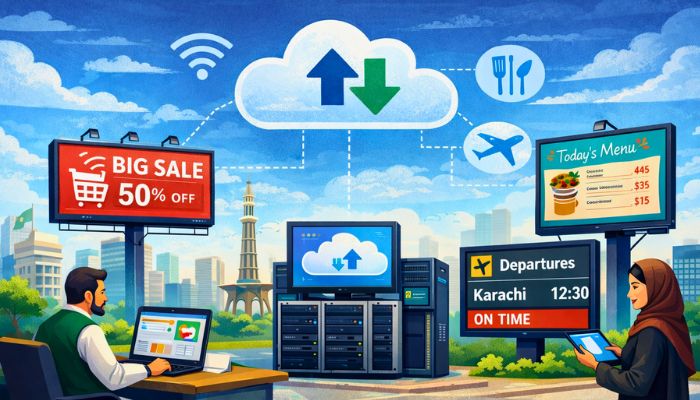
A CMS (Content Management System) for digital signage is software that lets you create, schedule, and push content to your digital screens — from anywhere, at any time, using just a web browser or mobile device.
Think of it as the brain behind your screens. The hardware (standee, kiosk, LED display, video wall) is the body — but without a smart CMS controlling it, that hardware is just an expensive static screen.
A cloud-based digital signage CMS takes this a step further by removing the need for any on-site servers or local installations. Everything runs over the internet. Log in from your phone in Multan, push a new campaign to 50 screens in Karachi, and it’s live within seconds.
Why Cloud-Based CMS Is the Right Choice for Pakistani Businesses in 2026
1. Real-Time Content Updates Across All Locations
Whether you need to update a price, swap a promotion, or broadcast an urgent message across your entire network — a cloud CMS makes it instant. No USB drives, no technician visits, no delays.
For businesses in fast-moving industries like banking, telecom, retail, and fuel stations — where prices and offers change daily — this capability is not a luxury. It’s a business necessity.
2. Manage Every Screen from One Dashboard
Whether you have 2 screens or 200, a cloud CMS gives you a single, centralized view of your entire signage network. You can see which screens are online, what content is playing, when campaigns are scheduled, and which displays need attention — all from one place.
3. Schedule Content in Advance
Smart scheduling means your screens always show the right content at the right time — automatically. Set up morning promotions, lunchtime offers, evening campaigns, and weekend specials once, and let the system handle the rest. No manual intervention required.
4. Reduce Operational Costs
Eliminating the need for on-site content updates dramatically cuts operational costs. Industry data shows that schedule automation through a CMS can reduce marketing team operational costs by as much as 10–25%. For a business with multiple locations across Pakistan, that saving adds up quickly.
5. Works on Any Screen, Anywhere
A good cloud CMS is hardware-agnostic. It can turn virtually any commercial display — digital standees, kiosks, SMD screens, video walls, LED panels — into a smart, remotely managed screen. Existing hardware doesn’t have to be replaced; it just gets smarter.
6. Consistent Brand Communication Nationwide
One of the biggest challenges for businesses operating across multiple Pakistani cities is maintaining consistent brand messaging. A cloud CMS ensures that every screen, in every city, is always showing the approved, on-brand content — with no risk of outdated material damaging your image.
Key Features to Look For in a Digital Signage CMS
Not all CMS platforms are created equal. When evaluating a digital signage content management system for your Pakistan-based business, prioritize these features:
Remote Content Management The ability to update, replace, and schedule content on any screen from any location is the most fundamental feature. Look for a platform with a clean, intuitive dashboard that doesn’t require technical expertise to operate.
Content Scheduling & Automation Flexible scheduling — by time of day, day of the week, or specific screen location — allows you to run different communication scenarios automatically, without any manual effort each time.
Multi-Screen & Multi-Zone Support Your CMS should support multiple screens simultaneously and allow different content zones within a single screen — for example, a main video on one side and a scrolling ticker or weather widget on the other.
Media Format Compatibility Videos, images, HTML5 content, PDFs, social media feeds, live data — a capable CMS should support all major formats so your creative team is never limited.
User Roles & Permissions For businesses with branch managers, marketing teams, and head office staff all needing different levels of access, role-based permissions ensure the right people can do the right things — and nothing else.
Real-Time Monitoring & Alerts Know instantly if a screen goes offline, content fails to load, or a player disconnects. Proactive alerts mean you fix issues before customers ever notice them.
Mobile Accessibility In 2026, your CMS should work from a smartphone. Whether you’re in a meeting, traveling between cities, or working remotely, you should be able to manage your entire screen network from your pocket.
How the Digix Cloud CMS Works
Digix Digital’s proprietary cloud-based CMS is purpose-built for the Pakistani market — designed to handle the specific operational, connectivity, and business requirements of local enterprises.
Here’s how it works in practice:
Step 1 — Connect Your Screens Any Digix digital signage hardware — standees, kiosks, SMD screens, video walls, or even third-party displays — connects to the Digix CMS platform through a simple setup process.
Step 2 — Upload & Create Content Use the intuitive dashboard to upload images, videos, promotional graphics, or dynamic data content. No design expertise required — pre-built templates make content creation fast and professional.
Step 3 — Schedule & Deploy Assign content to specific screens or groups of screens. Set schedules for different times, days, or campaign periods. Hit publish — and your content goes live across your entire network instantly.
Step 4 — Monitor & Optimize Track which screens are live, what content is playing, and how your network is performing — all from the same dashboard, in real time, from anywhere in Pakistan or beyond.
Industries in Pakistan That Need Cloud CMS for Digital Signage
Retail & Fashion Chains
Brands like Khaadi, Nishat Linen, and Levis operating across multiple city branches need consistent, up-to-date promotional content on every in-store screen. A cloud CMS makes seasonal campaigns and flash promotions effortless to deploy nationwide.
Banking & Financial Services
Banks like HBL, MCB, Allied Bank, and Bank Alfalah manage hundreds of branches across Pakistan. Cloud-managed digital standees and screens in their branches display interest rates, product promotions, and service information — all updated from one central team.
Petroleum & Fuel Retail
Shell, Total Parco, PSO, and Attock operate large networks of forecourt screens and indoor displays at fuel stations. Real-time fuel price updates and promotional content need to be accurate and timely — making cloud CMS essential.
Restaurants & Food Chains
Pizza Hut, McDonald’s, and local restaurant chains use cloud-managed digital menu boards to update prices, add limited-time offers, and remove sold-out items — all without any on-site effort.
Telecom Franchise Networks
Jazz, Telenor, Ufone, and Zong have extensive franchise and service center networks across Pakistan. A cloud CMS ensures that every screen in every franchise is showing current packages and promotions — not last month’s offers.
Corporate Offices & Lobbies
Large enterprises use cloud-managed lobby displays, meeting room screens, and employee communication boards to deliver real-time announcements, KPIs, and company news to all staff — automatically.
Cloud CMS vs. Traditional (USB/Local Server) Screen Management: A Comparison
| Feature | Cloud CMS | USB / Local Server |
|---|---|---|
| Update content remotely | ✅ Yes — instantly | ❌ No — requires physical visit |
| Manage multiple locations | ✅ Yes — from one dashboard | ❌ No — each location separately |
| Content scheduling | ✅ Automated | ❌ Manual |
| Real-time monitoring | ✅ Live alerts & status | ❌ Not possible |
| Cost over time | ✅ Lower — no travel, no technicians | ❌ Higher — ongoing field visits |
| Scalability | ✅ Add screens instantly | ❌ Complex, costly to scale |
| Mobile access | ✅ From any device | ❌ On-site only |
The choice is clear. For any Pakistani business with more than one screen — or any ambition to grow — a cloud-based CMS is the only sensible path forward.
Turn Every Screen Into a Smart Display with Digix CMS
Pakistan’s most forward-thinking businesses are already managing their digital signage networks through the cloud — updating content in seconds, running perfectly timed campaigns, and eliminating the cost and chaos of manual screen management.
If your screens are still being managed with USB drives, local servers, or technician visits — it’s time to upgrade.
Digix Digital’s cloud-based CMS gives your business complete control over every screen, from anywhere in Pakistan, at any time. Whether you manage 1 screen or 500, Digix CMS is the smarter, faster, and more cost-effective way to run your digital signage network.
📍 Head Office: 74 Main Industrial Estate, Kot Lakhpat, Lahore, Pakistan 📞 Call/WhatsApp: 0302-8421126 | 0302-8484782 | 0301-4891989 📧 Email: info@digix.biz 🌐 Website: digixdigital.biz
Request a free CMS demo today — and see how Digix can transform the way you manage your screens.
FAQ Questions About Digital Signage CMS in Pakistan
Q: Do I need technical expertise to use a cloud digital signage CMS? No. Modern cloud CMS platforms — including the Digix CMS — are built for non-technical users. If you can use a smartphone, you can manage your screens.
Q: Can the Digix CMS work with screens I already own? Yes. The Digix CMS is designed to work with a wide range of commercial display hardware — not just Digix-manufactured products. Any screen can become a smart, cloud-managed display.
Q: What happens to my screens if the internet goes down? Most professional digital signage CMS platforms — including Digix CMS — store content locally on the media player. If the connection drops, your screens continue playing the last scheduled content uninterrupted until connectivity is restored.
Q: Is a cloud CMS suitable for a small business with just 1 or 2 screens? Absolutely. Cloud CMS solutions scale to any size. Even a single digital standee in a shop benefits from the ability to update content remotely, schedule promotions, and monitor screen status — without sending someone on-site every time.
Q: How secure is cloud-based digital signage management? Enterprise-grade digital signage CMS platforms use encrypted connections, role-based access controls, and secure login protocols to protect your content and screen network from unauthorized access.